Well, it’s noon and your phone’s battery is already at 37 percent. There are ways to avert this disaster, adding more battery capacity to your favorite smartphone.
Option 1: The Battery Case
The first option you can choose is a battery case. This is exactly what it sounds like. It’s a case you put your phone in — like a typical case designed just to protect your phone — but the case is thicker than normal and includes a built-in battery. The case itelf plugs into your phone’s charging port, and you generally plug the charging cable directly into the case’s charging port when it’s time to charge both your phone and the battery case itself.
Technically, this is just getting a separate battery and carrying it around with you. In practice, a battery case gives your phone more battery power at the cost of increased thickness. The case just becomes part of your phone — you don’t need to carry a separate battery pack in your pocket and attach your phone to it via a cable when it’s time to recharge. Just flip a switch and the battery pack will charge your phone with the power from its own battery. The battery pack can even be charged at the same time you charge your phone, so it’s not even a second device to charge.
This is probably the ideal option for most phones if you consistently need more battery power to make it through a day. Mophie’s line of iPhone battery cases are probably the most well-known, but Mophie has also made cases for other smartphones. They’re not the only company that’s made battery cases, either. Just be sure to get a battery case designed for your specific model of phone so it will fit! Search on Amazon or a similar website and you’ll find many battery cases to choose from.
Option 2: The Aftermarket Battery Replacement
Most phones don’t have user-replaceable batteries anymore, but some do. Samsung’s line of Galaxy phones stand out here, with even the high-end Galaxy S5 and other S-series phones offering user-replaceable batteries. Because these batteries and the entire plastic back panel of the phone can be removed and replaced, it’s possible to get aftermarket batteries that are larger, complete with new back panels to accomodate them.
If you have a phone with a user-replaceable battery, you can probably buy a larger replacement battery for it. The battery and its accompanying back replace your phone’s existing battery, so it’s a more effective solution than a battery case with a battery separate from your phone’s battery. Perform a search for “extended battery” and the name of your phone to find one. For example, you can pick up third-party extended batteries that promise three times the battery life for your Samsung Galaxy S5 for $40 or so on Amazon.
As with a battery case, this will make your phone thicker and larger. Whether that’s worth the trade-off is up to you — if you struggle to make it through a day with your phone’s current battery, it probably will be worth it. But, whatever you do, don’t buy super-cheap battery replacements.
Option 3: Just Carry Around a Separate Battery Pack
There’s also the external battery pack option. Rather than replacing your phone’s battery or adding a battery case, you can just carry a separate battery pack around with you and connect it to your phone with a cable whenever you need to charge your phone away from an outlet. This has the benefit of ensuring your phone stays thin, and you can use the battery pack to charge other devices that might need more power — a tablet, for example.
Editor’s Note: for our recent trip to CES 2015, we bought this RAVPower external battery pack and it worked amazingly well. We were able to recharge an iPhone 6 repeatedly throughout the trip without having to recharge the battery pack at all.
But there are downsides here. The battery pack is yet another thing you have to carry, so it’ll be difficult to pocket and will be more at home in a bag. You’ll have to connect it to your phone via a cable, so you can’t just tuck your phone into your pocket normally and have it charging as you could with a battery case. You’ll also need to charge your battery pack separately, so it’s yet another thing you have to charge at the end of the day.
Still, a battery pack isn’t a bad option. If you only need the extra power for your phone occasionally, it’s a good option you can take with you if you know you’ll be using your phone a lot on a particular day. On days when you won’t be using your phone much, you can take your still-thin phone with you and leave the battery pack at home. However, if you struggle to make it through every single day with your phone’s battery, a battery case or extended battery is a more convenient option you can always take with you and always have in your pocket.
Charging your phone throughout the day can also help. Whenever you’re using your computer, you can plug your smartphone into it via its charging cable — the one with a USB connection — and your phone will charge from the computer. There’s no memory effect with modern batteries, so regularly topping your phone off throughout the day won’t actually damage the battery.
All Cell Phone Battery in here, such as Acer,LG, Apple, Lenovo and Samsung Cell Phone Battery and so on.
Tuesday, 23 July 2019

Debunking Battery Life Myths for Mobile Phones, Tablets, and Laptops
Batteries need to be cared for properly — they’re a critical part of our mobile devices and battery technology hasn’t advanced as fast as other technologies. Unfortunately, there’s a lot of incorrect information about batteries out there.
Some of the big myths come from old battery technologies and are actively harmful when applied to new battery technologies. For example, nickel-based batteries needed to be fully discharged, while modern lithium batteries shouldn’t be fully discharged.
Perform Shallow Discharges; Avoid Frequent Full Discharges
Old NiMH and NiCd batteries had a “memory effect” and had to be completely discharged from 100% to 0% to keep their capacity. Modern devices use Lithium Ion batteries, which work differently and have no memory effect. In fact, completely discharging a Li-ion battery is bad for it. You should try to perform shallow discharges — discharge the battery to something like 40-70% before recharging it, for example. Try to never let your battery go below 20% except in rare circumstances.
If you were to discharge your battery to 50%, recharge it, and then discharge it to 50% again, that would count as a single “cycle” with modern Li-ion batteries. You don’t need to worry about performing shallow charges.
There’s only one problem that shallow discharges can cause. Laptops can get a bit confused by shallow discharges and may show you wrong estimates for how long your device’s battery will last. Laptop manufacturers recommend you perform a full discharge about once per month to help calibrate the device’s battery time estimate.
Heat (and Cold) Can Damage Batteries
Heat can reduce a battery’s capacity. This affects all types of devices — even smartphones heat up when performing demanding tasks — but laptops can become hottest of all when under load. The battery is in the laptop, near the electronics that become hot while working heavily — this contributes to battery wear.
If you have a laptop that you use plugged in all of the time and it gets quite hot, removing the battery can increase the battery’s life by limiting the battery’s exposure to the heat of your laptop. This won’t make too much of a difference in normal use, but if you’re using a laptop to play a lot of demanding games and it’s heating up quite a bit, it may be helpful. Of course, this only applies to laptops with removable batteries.
Your climate is also a concern. If it gets very hot where you live or you store your device somewhere that gets very hot — say, a hot car left in the sun on a summer day — your battery will wear down faster. Keep your devices near room temperature and avoid storing them in very hot places, such as hot cars on summer days.
Extreme cold temperatures can decrease the lifespan of your battery, too. Don’t put a spare battery in the freezer or expose any device with a battery to similarly cold temperatures if you’re in a region with cold temperatures.
Don’t Leave the Battery At 0%
You shouldn’t leave the battery in a fully discharged state for very long. Ideally, the battery wouldn’t discharge all the way to zero very often — but if it does, you should recharge it as soon as possible. You don’t have to race to a power outlet when your smartphone dies, but don’t throw it in your drawer and leave it there for weeks without charging it. If you let the battery discharge completely and leave your device in a closet, the battery may become incapable of holding a charge at all, dying completely.
Store Batteries at 50% Charge
On the other hand, leaving the battery charged fully for an extended period of time could result in a loss of capacity and shorten its life. Ideally, you’d store the battery at 50% charge if you weren’t going to use it for a while. Apple recommends you leave the battery at 50% if you intend on storing the device more than six months. If you’re using it regularly, you shouldn’t need to worry about its state — although you never want to leave a battery at 0% for too long.
Storing the battery while fully discharged could result in the battery dying completely, while storing the battery at full charge could result in the loss of some battery capacity and shorten your battery’s life.
This applies to both batteries in devices and spare batteries you may have lying around — keep them at 50% if you won’t be using them for some time.
Leaving Your Laptop Plugged in All The Time Is Okay, But…
This one appears to be fairly controversial. We’ve previously covered the eternal question of whether it’s okay to leave your laptop plugged in all the time. We concluded that it’s okay and the battery’s temperature is the main thing you need to worry about. Apple disagrees, recommending against leaving its Macbook Air and Macbook Pro notebooks plugged in all the time.
Ultimately, we’re both saying the same thing. It’s fine to leave your laptop plugged in at your desk when you’re using it, as the laptop won’t “overcharge” the battery — it will stop charging when it reaches capacity. However, just as you shouldn’t store your laptop’s battery at full capacity in a closet, you shouldn’t leave your laptop plugged in for months on end with the battery at full capacity. Allow your laptop’s battery to occasionally discharge somewhat before charging it back up — that will keep the electrons flowing and keep the battery from losing capacity.
Battery University says that “the worst situation is keeping a fully charged battery at elevated temperatures.” If your laptop produces a lot of heat, removing it might be a good idea. If you have a fairly cool laptop that you occasionally let discharge a reasonable amount, leaving it plugged in — even for days on end — shouldn’t be a problem. If your laptop gets extremely hot, you may want to remove the battery, as we mentioned above.
Batteries Will Always Wear Down
Like all other types of batteries, Li-ion batteries will wear down over time, holding less and less charge. Apple says its laptop batteries will reach 80% of their original capacity after “up to” 1000 full discharge cycles. Other manufacturers commonly rate their batteries 300 to 500 cycles.
The batteries can still be used after this point, but they’ll hold less electricity and will power your devices for shorter and shorter periods of time. They’ll continue losing capacity the more you use them. Heat and aging will reduce the battery’s life, too.
Whatever you do, your devices’ batteries will slowly wear down over time. With proper care, you can make them hold a long charge for longer — but there’s no stopping entropy. Hopefully, your device will be due for an upgrade by the time its battery dies.
Largest range of Laptop Batteries, Chargers & AC adapters. Find the right battery, ac adapters for your phone or tablet. 12 Month Warranty,30 Days Money Back!
Some of the big myths come from old battery technologies and are actively harmful when applied to new battery technologies. For example, nickel-based batteries needed to be fully discharged, while modern lithium batteries shouldn’t be fully discharged.
Perform Shallow Discharges; Avoid Frequent Full Discharges
Old NiMH and NiCd batteries had a “memory effect” and had to be completely discharged from 100% to 0% to keep their capacity. Modern devices use Lithium Ion batteries, which work differently and have no memory effect. In fact, completely discharging a Li-ion battery is bad for it. You should try to perform shallow discharges — discharge the battery to something like 40-70% before recharging it, for example. Try to never let your battery go below 20% except in rare circumstances.
If you were to discharge your battery to 50%, recharge it, and then discharge it to 50% again, that would count as a single “cycle” with modern Li-ion batteries. You don’t need to worry about performing shallow charges.
There’s only one problem that shallow discharges can cause. Laptops can get a bit confused by shallow discharges and may show you wrong estimates for how long your device’s battery will last. Laptop manufacturers recommend you perform a full discharge about once per month to help calibrate the device’s battery time estimate.
Heat (and Cold) Can Damage Batteries
Heat can reduce a battery’s capacity. This affects all types of devices — even smartphones heat up when performing demanding tasks — but laptops can become hottest of all when under load. The battery is in the laptop, near the electronics that become hot while working heavily — this contributes to battery wear.
If you have a laptop that you use plugged in all of the time and it gets quite hot, removing the battery can increase the battery’s life by limiting the battery’s exposure to the heat of your laptop. This won’t make too much of a difference in normal use, but if you’re using a laptop to play a lot of demanding games and it’s heating up quite a bit, it may be helpful. Of course, this only applies to laptops with removable batteries.
Your climate is also a concern. If it gets very hot where you live or you store your device somewhere that gets very hot — say, a hot car left in the sun on a summer day — your battery will wear down faster. Keep your devices near room temperature and avoid storing them in very hot places, such as hot cars on summer days.
Extreme cold temperatures can decrease the lifespan of your battery, too. Don’t put a spare battery in the freezer or expose any device with a battery to similarly cold temperatures if you’re in a region with cold temperatures.
Don’t Leave the Battery At 0%
You shouldn’t leave the battery in a fully discharged state for very long. Ideally, the battery wouldn’t discharge all the way to zero very often — but if it does, you should recharge it as soon as possible. You don’t have to race to a power outlet when your smartphone dies, but don’t throw it in your drawer and leave it there for weeks without charging it. If you let the battery discharge completely and leave your device in a closet, the battery may become incapable of holding a charge at all, dying completely.
Store Batteries at 50% Charge
On the other hand, leaving the battery charged fully for an extended period of time could result in a loss of capacity and shorten its life. Ideally, you’d store the battery at 50% charge if you weren’t going to use it for a while. Apple recommends you leave the battery at 50% if you intend on storing the device more than six months. If you’re using it regularly, you shouldn’t need to worry about its state — although you never want to leave a battery at 0% for too long.
Storing the battery while fully discharged could result in the battery dying completely, while storing the battery at full charge could result in the loss of some battery capacity and shorten your battery’s life.
This applies to both batteries in devices and spare batteries you may have lying around — keep them at 50% if you won’t be using them for some time.
Leaving Your Laptop Plugged in All The Time Is Okay, But…
This one appears to be fairly controversial. We’ve previously covered the eternal question of whether it’s okay to leave your laptop plugged in all the time. We concluded that it’s okay and the battery’s temperature is the main thing you need to worry about. Apple disagrees, recommending against leaving its Macbook Air and Macbook Pro notebooks plugged in all the time.
Ultimately, we’re both saying the same thing. It’s fine to leave your laptop plugged in at your desk when you’re using it, as the laptop won’t “overcharge” the battery — it will stop charging when it reaches capacity. However, just as you shouldn’t store your laptop’s battery at full capacity in a closet, you shouldn’t leave your laptop plugged in for months on end with the battery at full capacity. Allow your laptop’s battery to occasionally discharge somewhat before charging it back up — that will keep the electrons flowing and keep the battery from losing capacity.
Battery University says that “the worst situation is keeping a fully charged battery at elevated temperatures.” If your laptop produces a lot of heat, removing it might be a good idea. If you have a fairly cool laptop that you occasionally let discharge a reasonable amount, leaving it plugged in — even for days on end — shouldn’t be a problem. If your laptop gets extremely hot, you may want to remove the battery, as we mentioned above.
Batteries Will Always Wear Down
Like all other types of batteries, Li-ion batteries will wear down over time, holding less and less charge. Apple says its laptop batteries will reach 80% of their original capacity after “up to” 1000 full discharge cycles. Other manufacturers commonly rate their batteries 300 to 500 cycles.
The batteries can still be used after this point, but they’ll hold less electricity and will power your devices for shorter and shorter periods of time. They’ll continue losing capacity the more you use them. Heat and aging will reduce the battery’s life, too.
Whatever you do, your devices’ batteries will slowly wear down over time. With proper care, you can make them hold a long charge for longer — but there’s no stopping entropy. Hopefully, your device will be due for an upgrade by the time its battery dies.
Largest range of Laptop Batteries, Chargers & AC adapters. Find the right battery, ac adapters for your phone or tablet. 12 Month Warranty,30 Days Money Back!
How to Choose a Replacement Battery for Your Cell Phone
Most modern cell phones are more than just a communication device; they also serve as a navigation system, a Web browser, a handheld game system, a music player, a day-planner and much more. It's getting harder and harder to get by without one of these multifunction cell phones. But running all those applications uses a lot of battery power.
Even with cell phone accessories like car chargers and emergency chargers, your battery power may not last long enough. Over time, your cell phone battery will start to degrade and battery life will shorten. When a cell phone battery starts to degrade, you may think of replacing your cell phone altogether. But if your cell phone is still fairly new, it may be less expensive to buy a replacement battery. This guide will help you choose a replacement battery for your cell phone.
Choosing a Replacement Battery:
1.Review your cell phone information.
To get the right type of replacement battery, you will need to know what kind of cell phone you have and what kind of battery is suitable. Most cell phone carriers rename the cell phones that they carry. You need to know the actual name and model number of your cell phone, not the cell phone’s carrier-assigned name, to find a replacement battery. This information can be found in your user manual. You may also want to write down the IMEI number and the battery type and serial number. You can also find it on the inside of your cell phone, usually on a sticker or plaque underneath the battery. Also, review your cell phone purchase information. Many cell phone companies offer a one-year warranty for batteries.
2.Contact your cell phone manufacturer.
You can get cell phone manufacturer information easily on the Web. Ask them if they offer any warranty on the battery or cover the cost of a replacement battery. If they agree to pay for a replacement battery, they may ask for a proof of purchase to reimburse you. Also, don’t forget to check with your cell phone carrier or your cell phone manufacturer to see if using a third-party replacement battery voids the warranty.
3.Purchase a replacement battery.
If both the manufacturer and the cell phone carrier refuse to send you a replacement battery, you will need to find your own battery. You may find batteries made by both the original manufacturer and third-party manufacturers. Do your research before buying. More than one kind of replacement battery might be made with inferior materials or a low percentage of the active ingredient, have less battery power than a quality-made battery or have a short battery life. You don’t want to wind up purchasing another replacement battery in a few months.
Cell Phone Battery Tip
Remember to always dispose of your old cell phone battery by recycling it properly. Search online for places in your neighborhood that recycle dry-cell and rechargeable batteries. There are plenty of free recycling services to help you reduce your environmental impact.
Even with cell phone accessories like car chargers and emergency chargers, your battery power may not last long enough. Over time, your cell phone battery will start to degrade and battery life will shorten. When a cell phone battery starts to degrade, you may think of replacing your cell phone altogether. But if your cell phone is still fairly new, it may be less expensive to buy a replacement battery. This guide will help you choose a replacement battery for your cell phone.
Choosing a Replacement Battery:
1.Review your cell phone information.
To get the right type of replacement battery, you will need to know what kind of cell phone you have and what kind of battery is suitable. Most cell phone carriers rename the cell phones that they carry. You need to know the actual name and model number of your cell phone, not the cell phone’s carrier-assigned name, to find a replacement battery. This information can be found in your user manual. You may also want to write down the IMEI number and the battery type and serial number. You can also find it on the inside of your cell phone, usually on a sticker or plaque underneath the battery. Also, review your cell phone purchase information. Many cell phone companies offer a one-year warranty for batteries.
2.Contact your cell phone manufacturer.
You can get cell phone manufacturer information easily on the Web. Ask them if they offer any warranty on the battery or cover the cost of a replacement battery. If they agree to pay for a replacement battery, they may ask for a proof of purchase to reimburse you. Also, don’t forget to check with your cell phone carrier or your cell phone manufacturer to see if using a third-party replacement battery voids the warranty.
3.Purchase a replacement battery.
If both the manufacturer and the cell phone carrier refuse to send you a replacement battery, you will need to find your own battery. You may find batteries made by both the original manufacturer and third-party manufacturers. Do your research before buying. More than one kind of replacement battery might be made with inferior materials or a low percentage of the active ingredient, have less battery power than a quality-made battery or have a short battery life. You don’t want to wind up purchasing another replacement battery in a few months.
Cell Phone Battery Tip
Remember to always dispose of your old cell phone battery by recycling it properly. Search online for places in your neighborhood that recycle dry-cell and rechargeable batteries. There are plenty of free recycling services to help you reduce your environmental impact.
Monday, 22 July 2019
3.8V/4.35V Alcatel TLp020K2 Battery For Alcatel One Touch 6039H 6039Y 6039K
Buy Alcatel TLp020K2 Cell Phone Battery replacement for Alcatel One Touch 6039H 6039Y 6039K.
Fit Machine Model Alcatel One Touch 6039H 6039Y 6039K - 2000mAh/7.6WH - 3.8V/4.35V.
All products from our shop are 100% the highest quality! We provide the high quality Laptop Batteries. Alcatel TLp020K2 battery is best compatible with the original equipments.
OriccaBattery.co.uk ◆Free Shipping ◆ One year warranty ◆ 30 days money back guarantee.
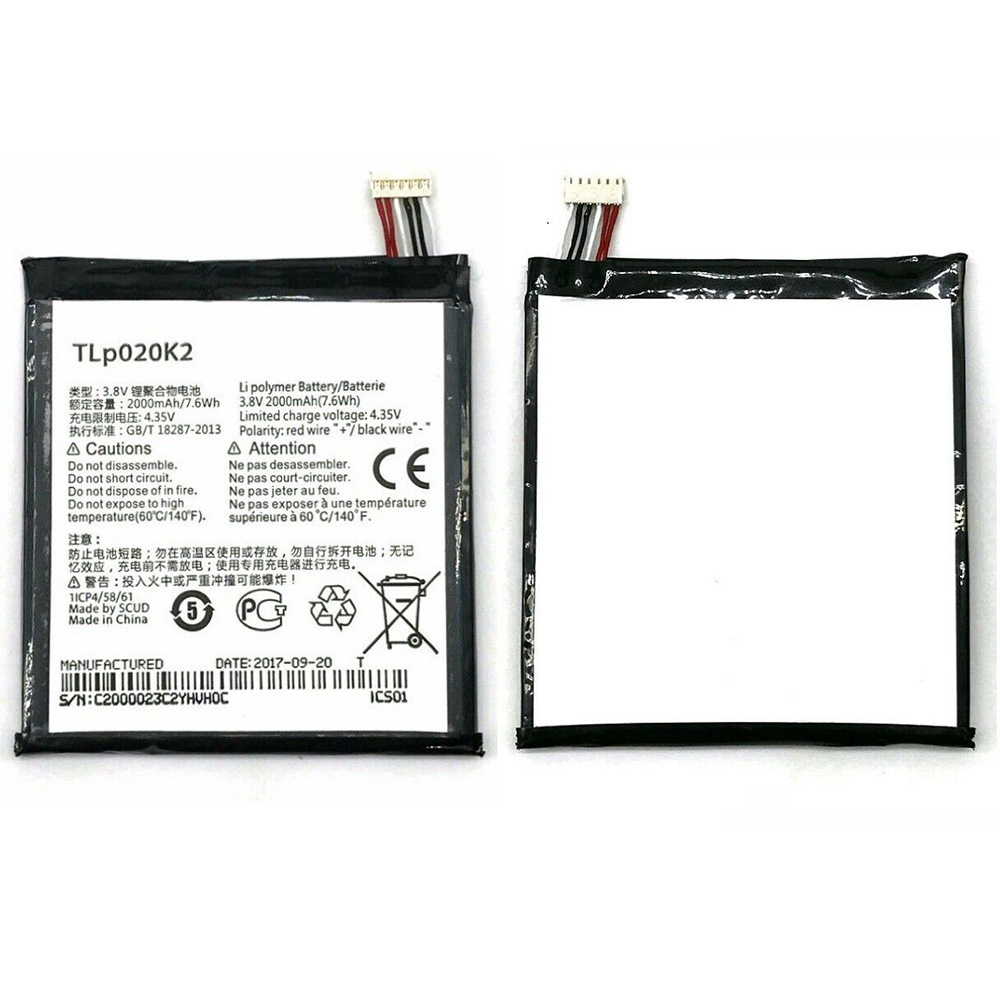
Alcatel TLp020K2 Specifications
Brand:Cell Phone Battery for Alcatel
Capacity:2000mAh/7.6WH
Voltage:3.8V/4.35V
Type:Li-ion
All products from our shop are 100% the highest quality!
We provide the high quality Laptop Adapters!
How to Maintenance your new replacement Alcatel TLp020K2 battery?
1. New Alcatel TLp020K2 battery pack must be fully charged before use.
2. New battery pack needs to be fully charged and discharged (cycled) a few times before it can condition to full capacity.
3.Laptop battery undergo self-discharging when left unused. Always store a Alcatel TLp020K2 battery pack in a fully charged stage for storage.
4. Fully drain and fully recharge your battery pack every few months.
5. Turn down the LCD brightness of your portable device.
6. Use built-in power management on your portable device.
7. Turn off LCD or other unnecessary accessories when not in use.
8. Set screen saver blank to 1 to 2 minutes of your notebook.
9. Add more RAM if you have extra RAM expansion slot, it will reduce the usage of hard drive and it is power exhaustive.
10. Close unused software in your Alcatel One Touch 6039H 6039Y 6039K phone .
11. Remove unused PC Cards or USB devices from your notebook.
12. Don´t watch DVD or play graphics intensive video games.
13. Don´t short circuit terminal or store your Alcatel TLp020K2 Cell Phone Batteries pack with metal parts. 14. Don´t drop or mutilate the Alcatel TLp020K2 battery pack.
15. Don´t expose to moisture or water.
Related popular recommendations:
58-000049 Battery Compatible Amazon Kindle PaperWhite 2nd Gen 6"
L14M2P21 Battery Compatible Lenovo S41-70 S41-70AM
ACDP-100D01 Laptop Adapters For Sony Vaio PCGA AC19V4 ACDP-100D01
TLI017C1 Battery Compatible Alcatel One Touch OT-5027B DAWN OT-4060O STREAK OT-4060A IDEAL
088796 Battery Compatible Bose Soundlink Mini 2 Pack
PA5162U-1BRS Battery Compatible Toshiba Portege R30 R30-A series
061384 Battery Compatible BOSE SOUNDLINK Mini Series
82-71363-04 Battery Compatible MOTOROLA MC70 MC75 FR68
FX30 Battery Compatible Motorola XT1575 Moto X Pure Edition / Moto X Style
Fit Machine Model Alcatel One Touch 6039H 6039Y 6039K - 2000mAh/7.6WH - 3.8V/4.35V.
All products from our shop are 100% the highest quality! We provide the high quality Laptop Batteries. Alcatel TLp020K2 battery is best compatible with the original equipments.
OriccaBattery.co.uk ◆Free Shipping ◆ One year warranty ◆ 30 days money back guarantee.
Battery TLp020K2 Replacement For Alcatel One Touch 6039H 6039Y 6039K
Alcatel TLp020K2 Specifications
Brand:Cell Phone Battery for Alcatel
Capacity:2000mAh/7.6WH
Voltage:3.8V/4.35V
Type:Li-ion
All products from our shop are 100% the highest quality!
We provide the high quality Laptop Adapters!
PRODUCT COMPATIBILITY:
TLp020K2REPLACEABILITY WITH THE FOLLOWING MODELS:
Alcatel One Touch 6039H 6039Y 6039KHow to Maintenance your new replacement Alcatel TLp020K2 battery?
1. New Alcatel TLp020K2 battery pack must be fully charged before use.
2. New battery pack needs to be fully charged and discharged (cycled) a few times before it can condition to full capacity.
3.Laptop battery undergo self-discharging when left unused. Always store a Alcatel TLp020K2 battery pack in a fully charged stage for storage.
4. Fully drain and fully recharge your battery pack every few months.
5. Turn down the LCD brightness of your portable device.
6. Use built-in power management on your portable device.
7. Turn off LCD or other unnecessary accessories when not in use.
8. Set screen saver blank to 1 to 2 minutes of your notebook.
9. Add more RAM if you have extra RAM expansion slot, it will reduce the usage of hard drive and it is power exhaustive.
10. Close unused software in your Alcatel One Touch 6039H 6039Y 6039K phone .
11. Remove unused PC Cards or USB devices from your notebook.
12. Don´t watch DVD or play graphics intensive video games.
13. Don´t short circuit terminal or store your Alcatel TLp020K2 Cell Phone Batteries pack with metal parts. 14. Don´t drop or mutilate the Alcatel TLp020K2 battery pack.
15. Don´t expose to moisture or water.
Related popular recommendations:
58-000049 Battery Compatible Amazon Kindle PaperWhite 2nd Gen 6"
L14M2P21 Battery Compatible Lenovo S41-70 S41-70AM
ACDP-100D01 Laptop Adapters For Sony Vaio PCGA AC19V4 ACDP-100D01
TLI017C1 Battery Compatible Alcatel One Touch OT-5027B DAWN OT-4060O STREAK OT-4060A IDEAL
088796 Battery Compatible Bose Soundlink Mini 2 Pack
PA5162U-1BRS Battery Compatible Toshiba Portege R30 R30-A series
061384 Battery Compatible BOSE SOUNDLINK Mini Series
82-71363-04 Battery Compatible MOTOROLA MC70 MC75 FR68
FX30 Battery Compatible Motorola XT1575 Moto X Pure Edition / Moto X Style
3.82V/4.4V Huawei HB366179ECW Battery For Huawei Nova 2 CAZ-AL10 CAZ-TL00
Buy Huawei HB366179ECW Cell Phone Battery replacement for Huawei Nova 2 CAZ-AL10 CAZ-TL00.
Fit Machine Model Huawei Nova 2 CAZ-AL10 CAZ-TL00 - 2850mAh/10.88WH - 3.82V/4.4V.
All products from our shop are 100% the highest quality! We provide the high quality Laptop Batteries. Huawei HB366179ECW battery is best compatible with the original equipments.
OriccaBattery.co.uk ◆Free Shipping ◆ One year warranty ◆ 30 days money back guarantee.
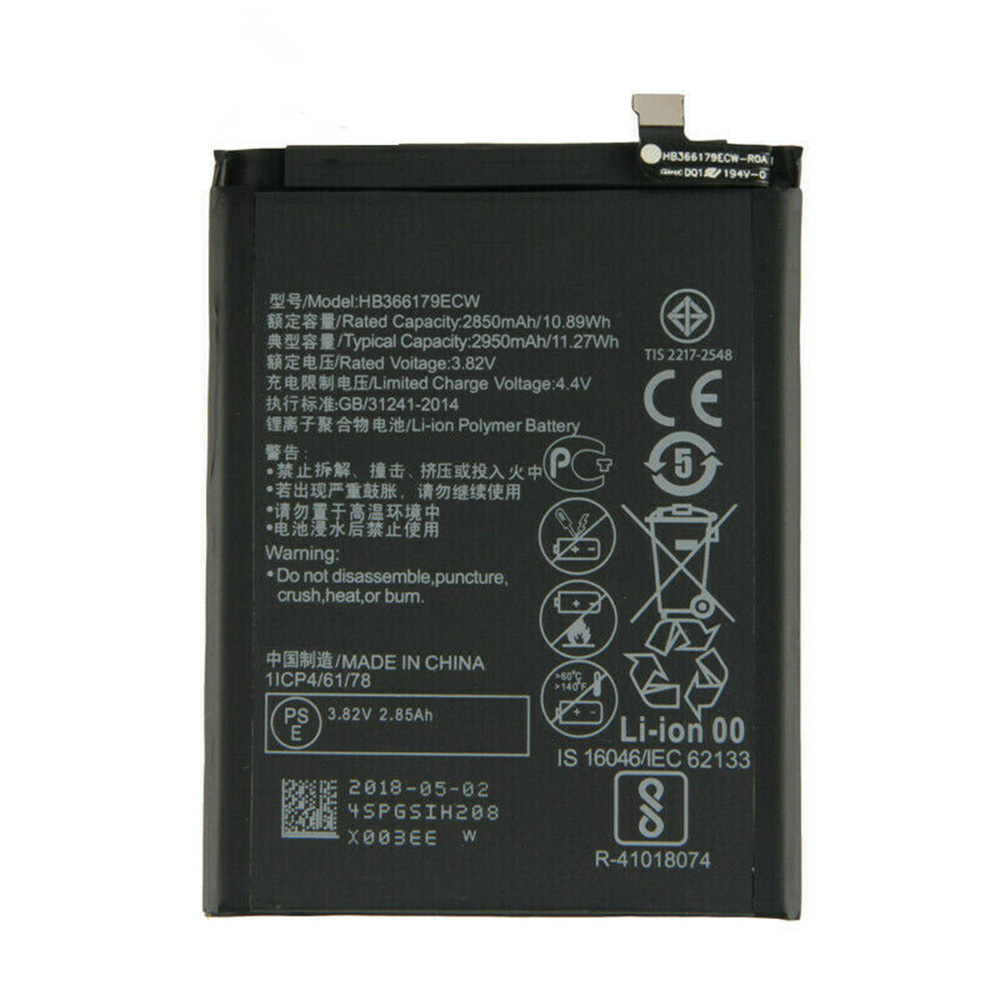
Huawei HB366179ECW Specifications
Brand:Cell Phone Battery for Huawei
Capacity:2850mAh/10.88WH
Voltage:3.82V/4.4V
Type:Li-ion
All products from our shop are 100% the highest quality!
We provide the high quality Laptop Adapters!
How to Maintenance your new replacement Huawei HB366179ECW battery?
1. New Huawei HB366179ECW battery pack must be fully charged before use.
2. New battery pack needs to be fully charged and discharged (cycled) a few times before it can condition to full capacity.
3.Laptop battery undergo self-discharging when left unused. Always store a Huawei HB366179ECW battery pack in a fully charged stage for storage.
4. Fully drain and fully recharge your battery pack every few months.
5. Turn down the LCD brightness of your portable device.
6. Use built-in power management on your portable device.
7. Turn off LCD or other unnecessary accessories when not in use.
8. Set screen saver blank to 1 to 2 minutes of your notebook.
9. Add more RAM if you have extra RAM expansion slot, it will reduce the usage of hard drive and it is power exhaustive.
10. Close unused software in your Huawei Nova 2 CAZ-AL10 CAZ-TL00 phone .
11. Remove unused PC Cards or USB devices from your notebook.
12. Don´t watch DVD or play graphics intensive video games.
13. Don´t short circuit terminal or store your Huawei HB366179ECW Cell Phone Batteries pack with metal parts. 14. Don´t drop or mutilate the Huawei HB366179ECW battery pack.
15. Don´t expose to moisture or water.
Related popular recommendations:
58-000049 Battery Compatible Amazon Kindle PaperWhite 2nd Gen 6"
L14M2P21 Battery Compatible Lenovo S41-70 S41-70AM
ACDP-100D01 Laptop Adapters For Sony Vaio PCGA AC19V4 ACDP-100D01
TLI017C1 Battery Compatible Alcatel One Touch OT-5027B DAWN OT-4060O STREAK OT-4060A IDEAL
088796 Battery Compatible Bose Soundlink Mini 2 Pack
PA5162U-1BRS Battery Compatible Toshiba Portege R30 R30-A series
061384 Battery Compatible BOSE SOUNDLINK Mini Series
82-71363-04 Battery Compatible MOTOROLA MC70 MC75 FR68
FX30 Battery Compatible Motorola XT1575 Moto X Pure Edition / Moto X Style
Fit Machine Model Huawei Nova 2 CAZ-AL10 CAZ-TL00 - 2850mAh/10.88WH - 3.82V/4.4V.
All products from our shop are 100% the highest quality! We provide the high quality Laptop Batteries. Huawei HB366179ECW battery is best compatible with the original equipments.
OriccaBattery.co.uk ◆Free Shipping ◆ One year warranty ◆ 30 days money back guarantee.
Battery HB366179ECW Replacement For Huawei Nova 2 CAZ-AL10 CAZ-TL00
Huawei HB366179ECW Specifications
Brand:Cell Phone Battery for Huawei
Capacity:2850mAh/10.88WH
Voltage:3.82V/4.4V
Type:Li-ion
All products from our shop are 100% the highest quality!
We provide the high quality Laptop Adapters!
PRODUCT COMPATIBILITY:
HB366179ECWREPLACEABILITY WITH THE FOLLOWING MODELS:
Huawei Nova 2 CAZ-AL10 CAZ-TL00How to Maintenance your new replacement Huawei HB366179ECW battery?
1. New Huawei HB366179ECW battery pack must be fully charged before use.
2. New battery pack needs to be fully charged and discharged (cycled) a few times before it can condition to full capacity.
3.Laptop battery undergo self-discharging when left unused. Always store a Huawei HB366179ECW battery pack in a fully charged stage for storage.
4. Fully drain and fully recharge your battery pack every few months.
5. Turn down the LCD brightness of your portable device.
6. Use built-in power management on your portable device.
7. Turn off LCD or other unnecessary accessories when not in use.
8. Set screen saver blank to 1 to 2 minutes of your notebook.
9. Add more RAM if you have extra RAM expansion slot, it will reduce the usage of hard drive and it is power exhaustive.
10. Close unused software in your Huawei Nova 2 CAZ-AL10 CAZ-TL00 phone .
11. Remove unused PC Cards or USB devices from your notebook.
12. Don´t watch DVD or play graphics intensive video games.
13. Don´t short circuit terminal or store your Huawei HB366179ECW Cell Phone Batteries pack with metal parts. 14. Don´t drop or mutilate the Huawei HB366179ECW battery pack.
15. Don´t expose to moisture or water.
Related popular recommendations:
58-000049 Battery Compatible Amazon Kindle PaperWhite 2nd Gen 6"
L14M2P21 Battery Compatible Lenovo S41-70 S41-70AM
ACDP-100D01 Laptop Adapters For Sony Vaio PCGA AC19V4 ACDP-100D01
TLI017C1 Battery Compatible Alcatel One Touch OT-5027B DAWN OT-4060O STREAK OT-4060A IDEAL
088796 Battery Compatible Bose Soundlink Mini 2 Pack
PA5162U-1BRS Battery Compatible Toshiba Portege R30 R30-A series
061384 Battery Compatible BOSE SOUNDLINK Mini Series
82-71363-04 Battery Compatible MOTOROLA MC70 MC75 FR68
FX30 Battery Compatible Motorola XT1575 Moto X Pure Edition / Moto X Style
3.8V Toshiba F19 Battery For Toshiba F-02C F-04C F-01e F-04D F-06B F-06D
Buy Toshiba F19 Cell Phone Battery replacement for Toshiba F-02C F-04C F-01e F-04D F-06B F-06D.
Fit Machine Model Toshiba F-02C F-04C F-01e F-04D F-06B F-06D - 3020mAh/12WH - 3.8V.
All products from our shop are 100% the highest quality! We provide the high quality Laptop Batteries. Toshiba F19 battery is best compatible with the original equipments.
OriccaBattery.co.uk ◆Free Shipping ◆ One year warranty ◆ 30 days money back guarantee.
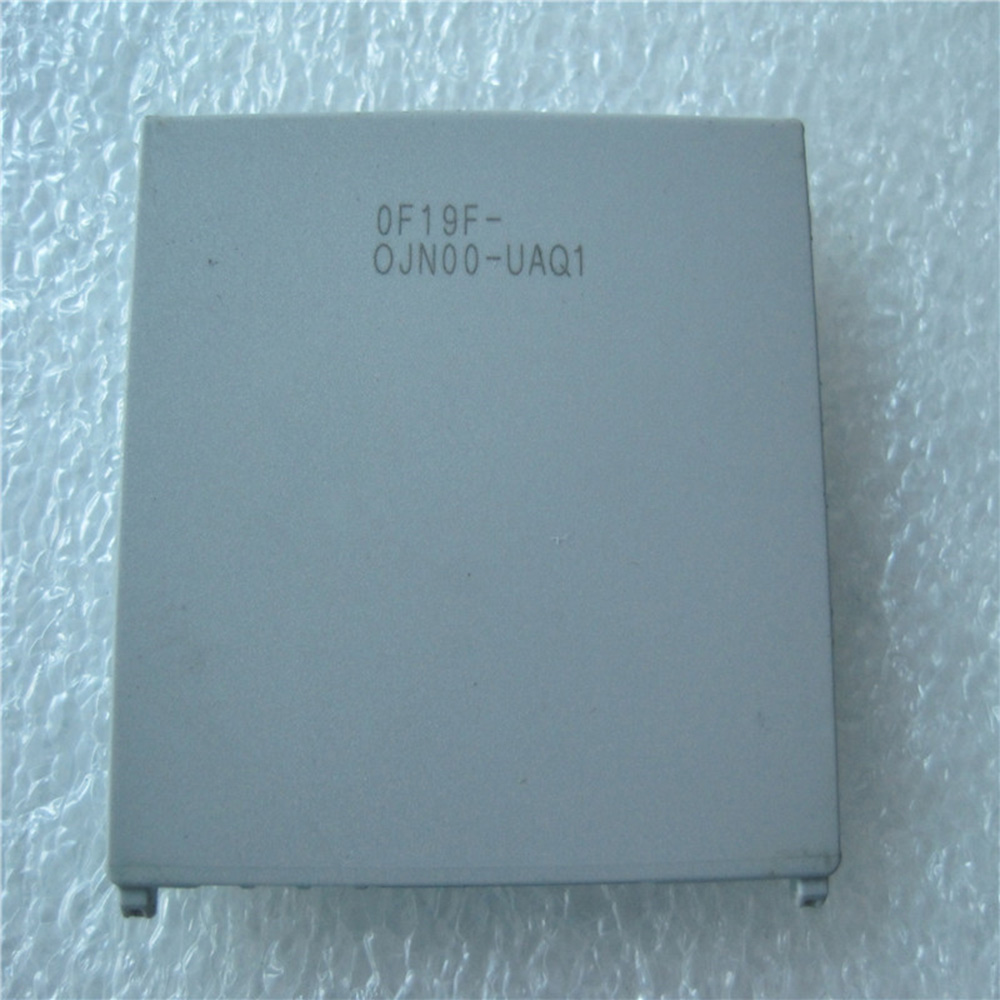
Toshiba F19 Specifications
Brand:Cell Phone Battery for Toshiba
Capacity:3020mAh/12WH
Voltage:3.8V
Type:Li-ion
All products from our shop are 100% the highest quality!
We provide the high quality Laptop Adapters!
How to Maintenance your new replacement Toshiba F19 battery?
1. New Toshiba F19 battery pack must be fully charged before use.
2. New battery pack needs to be fully charged and discharged (cycled) a few times before it can condition to full capacity.
3.Laptop battery undergo self-discharging when left unused. Always store a Toshiba F19 battery pack in a fully charged stage for storage.
4. Fully drain and fully recharge your battery pack every few months.
5. Turn down the LCD brightness of your portable device.
6. Use built-in power management on your portable device.
7. Turn off LCD or other unnecessary accessories when not in use.
8. Set screen saver blank to 1 to 2 minutes of your notebook.
9. Add more RAM if you have extra RAM expansion slot, it will reduce the usage of hard drive and it is power exhaustive.
10. Close unused software in your Toshiba F-02C F-04C F-01e F-04D F-06B F-06D phone .
11. Remove unused PC Cards or USB devices from your notebook.
12. Don´t watch DVD or play graphics intensive video games.
13. Don´t short circuit terminal or store your Toshiba F19 Cell Phone Batteries pack with metal parts. 14. Don´t drop or mutilate the Toshiba F19 battery pack.
15. Don´t expose to moisture or water.
Related popular recommendations:
58-000049 Battery Compatible Amazon Kindle PaperWhite 2nd Gen 6"
L14M2P21 Battery Compatible Lenovo S41-70 S41-70AM
ACDP-100D01 Laptop Adapters For Sony Vaio PCGA AC19V4 ACDP-100D01
TLI017C1 Battery Compatible Alcatel One Touch OT-5027B DAWN OT-4060O STREAK OT-4060A IDEAL
088796 Battery Compatible Bose Soundlink Mini 2 Pack
PA5162U-1BRS Battery Compatible Toshiba Portege R30 R30-A series
061384 Battery Compatible BOSE SOUNDLINK Mini Series
82-71363-04 Battery Compatible MOTOROLA MC70 MC75 FR68
FX30 Battery Compatible Motorola XT1575 Moto X Pure Edition / Moto X Style
Fit Machine Model Toshiba F-02C F-04C F-01e F-04D F-06B F-06D - 3020mAh/12WH - 3.8V.
All products from our shop are 100% the highest quality! We provide the high quality Laptop Batteries. Toshiba F19 battery is best compatible with the original equipments.
OriccaBattery.co.uk ◆Free Shipping ◆ One year warranty ◆ 30 days money back guarantee.
Battery F19 Replacement For Toshiba F-02C F-04C F-01e F-04D F-06B F-06D
Toshiba F19 Specifications
Brand:Cell Phone Battery for Toshiba
Capacity:3020mAh/12WH
Voltage:3.8V
Type:Li-ion
All products from our shop are 100% the highest quality!
We provide the high quality Laptop Adapters!
PRODUCT COMPATIBILITY:
F19REPLACEABILITY WITH THE FOLLOWING MODELS:
Toshiba F-02C F-04C F-01e F-04D F-06B F-06DHow to Maintenance your new replacement Toshiba F19 battery?
1. New Toshiba F19 battery pack must be fully charged before use.
2. New battery pack needs to be fully charged and discharged (cycled) a few times before it can condition to full capacity.
3.Laptop battery undergo self-discharging when left unused. Always store a Toshiba F19 battery pack in a fully charged stage for storage.
4. Fully drain and fully recharge your battery pack every few months.
5. Turn down the LCD brightness of your portable device.
6. Use built-in power management on your portable device.
7. Turn off LCD or other unnecessary accessories when not in use.
8. Set screen saver blank to 1 to 2 minutes of your notebook.
9. Add more RAM if you have extra RAM expansion slot, it will reduce the usage of hard drive and it is power exhaustive.
10. Close unused software in your Toshiba F-02C F-04C F-01e F-04D F-06B F-06D phone .
11. Remove unused PC Cards or USB devices from your notebook.
12. Don´t watch DVD or play graphics intensive video games.
13. Don´t short circuit terminal or store your Toshiba F19 Cell Phone Batteries pack with metal parts. 14. Don´t drop or mutilate the Toshiba F19 battery pack.
15. Don´t expose to moisture or water.
Related popular recommendations:
58-000049 Battery Compatible Amazon Kindle PaperWhite 2nd Gen 6"
L14M2P21 Battery Compatible Lenovo S41-70 S41-70AM
ACDP-100D01 Laptop Adapters For Sony Vaio PCGA AC19V4 ACDP-100D01
TLI017C1 Battery Compatible Alcatel One Touch OT-5027B DAWN OT-4060O STREAK OT-4060A IDEAL
088796 Battery Compatible Bose Soundlink Mini 2 Pack
PA5162U-1BRS Battery Compatible Toshiba Portege R30 R30-A series
061384 Battery Compatible BOSE SOUNDLINK Mini Series
82-71363-04 Battery Compatible MOTOROLA MC70 MC75 FR68
FX30 Battery Compatible Motorola XT1575 Moto X Pure Edition / Moto X Style
3.8V/4.35V TP-LINK TBL-55A1800 Battery For TP-LINK M7310
Buy TP-LINK TBL-55A1800 Battery replacement for TP-LINK M7310.
Fit Machine Model TP-LINK M7310 - 1800mAh/6.84WH - 3.8V/4.35V.
All products from our shop are 100% the highest quality! We provide the high quality Laptop Batteries. TP-LINK TBL-55A1800 battery is best compatible with the original equipments.
OriccaBattery.co.uk ◆Free Shipping ◆ One year warranty ◆ 30 days money back guarantee.
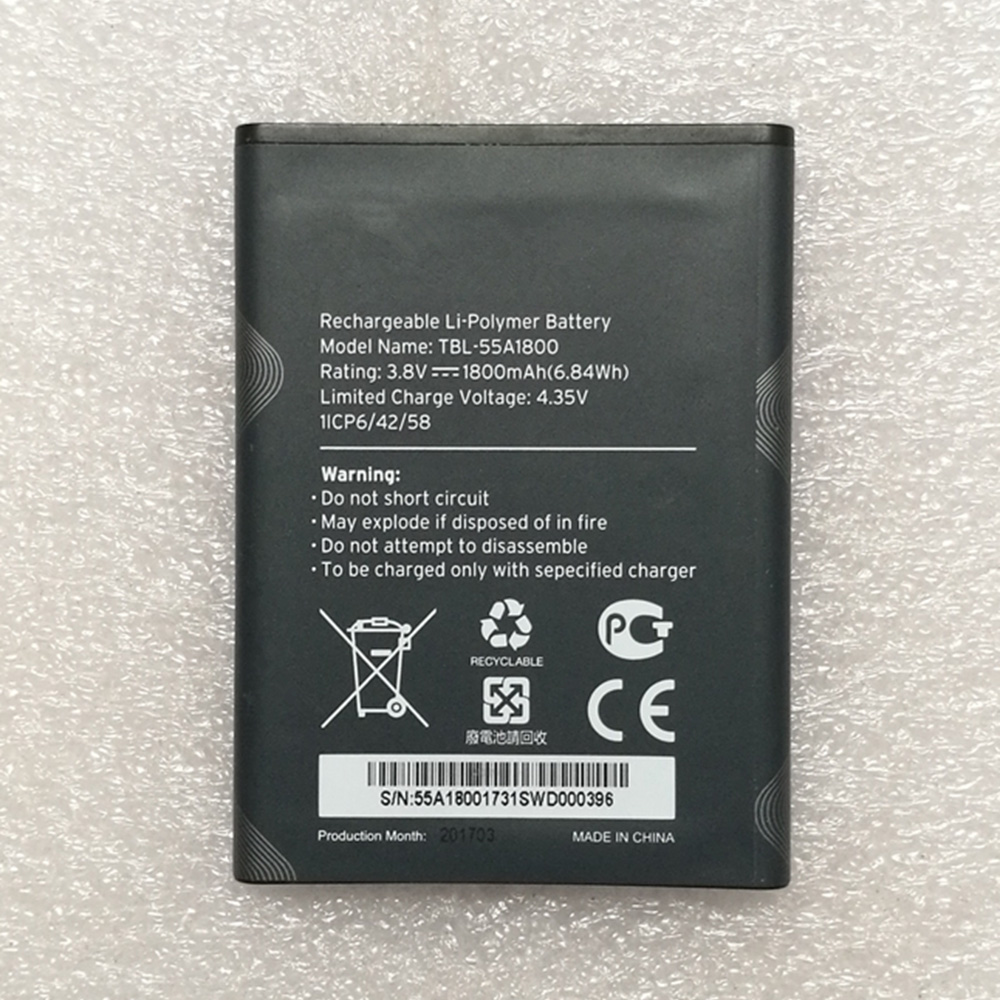
TP-LINK TBL-55A1800 Specifications
Brand: Battery for TP-LINK
Capacity:1800mAh/6.84WH
Voltage:3.8V/4.35V
Type:Li-ion
All products from our shop are 100% the highest quality!
We provide the high quality Laptop Adapters!
How to Maintenance your new replacement TP-LINK TBL-55A1800 battery?
1. New TP-LINK TBL-55A1800 battery pack must be fully charged before use.
2. New battery pack needs to be fully charged and discharged (cycled) a few times before it can condition to full capacity.
3.Laptop battery undergo self-discharging when left unused. Always store a TP-LINK TBL-55A1800 battery pack in a fully charged stage for storage.
4. Fully drain and fully recharge your battery pack every few months.
5. Turn down the LCD brightness of your portable device.
6. Use built-in power management on your portable device.
7. Turn off LCD or other unnecessary accessories when not in use.
8. Set screen saver blank to 1 to 2 minutes of your notebook.
9. Add more RAM if you have extra RAM expansion slot, it will reduce the usage of hard drive and it is power exhaustive.
10. Close unused software in your TP-LINK M7310 .
11. Remove unused PC Cards or USB devices from your notebook.
12. Don´t watch DVD or play graphics intensive video games.
13. Don´t short circuit terminal or store your TP-LINK TBL-55A1800 Batteries pack with metal parts. 14. Don´t drop or mutilate the TP-LINK TBL-55A1800 battery pack.
15. Don´t expose to moisture or water.
Related popular recommendations:
58-000049 Battery Compatible Amazon Kindle PaperWhite 2nd Gen 6"
L14M2P21 Battery Compatible Lenovo S41-70 S41-70AM
ACDP-100D01 Laptop Adapters For Sony Vaio PCGA AC19V4 ACDP-100D01
TLI017C1 Battery Compatible Alcatel One Touch OT-5027B DAWN OT-4060O STREAK OT-4060A IDEAL
088796 Battery Compatible Bose Soundlink Mini 2 Pack
PA5162U-1BRS Battery Compatible Toshiba Portege R30 R30-A series
061384 Battery Compatible BOSE SOUNDLINK Mini Series
82-71363-04 Battery Compatible MOTOROLA MC70 MC75 FR68
FX30 Battery Compatible Motorola XT1575 Moto X Pure Edition / Moto X Style
Fit Machine Model TP-LINK M7310 - 1800mAh/6.84WH - 3.8V/4.35V.
All products from our shop are 100% the highest quality! We provide the high quality Laptop Batteries. TP-LINK TBL-55A1800 battery is best compatible with the original equipments.
OriccaBattery.co.uk ◆Free Shipping ◆ One year warranty ◆ 30 days money back guarantee.
Battery TBL-55A1800 Replacement For TP-LINK M7310
TP-LINK TBL-55A1800 Specifications
Brand: Battery for TP-LINK
Capacity:1800mAh/6.84WH
Voltage:3.8V/4.35V
Type:Li-ion
All products from our shop are 100% the highest quality!
We provide the high quality Laptop Adapters!
PRODUCT COMPATIBILITY:
TBL-55A1800REPLACEABILITY WITH THE FOLLOWING MODELS:
TP-LINK M7310How to Maintenance your new replacement TP-LINK TBL-55A1800 battery?
1. New TP-LINK TBL-55A1800 battery pack must be fully charged before use.
2. New battery pack needs to be fully charged and discharged (cycled) a few times before it can condition to full capacity.
3.Laptop battery undergo self-discharging when left unused. Always store a TP-LINK TBL-55A1800 battery pack in a fully charged stage for storage.
4. Fully drain and fully recharge your battery pack every few months.
5. Turn down the LCD brightness of your portable device.
6. Use built-in power management on your portable device.
7. Turn off LCD or other unnecessary accessories when not in use.
8. Set screen saver blank to 1 to 2 minutes of your notebook.
9. Add more RAM if you have extra RAM expansion slot, it will reduce the usage of hard drive and it is power exhaustive.
10. Close unused software in your TP-LINK M7310 .
11. Remove unused PC Cards or USB devices from your notebook.
12. Don´t watch DVD or play graphics intensive video games.
13. Don´t short circuit terminal or store your TP-LINK TBL-55A1800 Batteries pack with metal parts. 14. Don´t drop or mutilate the TP-LINK TBL-55A1800 battery pack.
15. Don´t expose to moisture or water.
Related popular recommendations:
58-000049 Battery Compatible Amazon Kindle PaperWhite 2nd Gen 6"
L14M2P21 Battery Compatible Lenovo S41-70 S41-70AM
ACDP-100D01 Laptop Adapters For Sony Vaio PCGA AC19V4 ACDP-100D01
TLI017C1 Battery Compatible Alcatel One Touch OT-5027B DAWN OT-4060O STREAK OT-4060A IDEAL
088796 Battery Compatible Bose Soundlink Mini 2 Pack
PA5162U-1BRS Battery Compatible Toshiba Portege R30 R30-A series
061384 Battery Compatible BOSE SOUNDLINK Mini Series
82-71363-04 Battery Compatible MOTOROLA MC70 MC75 FR68
FX30 Battery Compatible Motorola XT1575 Moto X Pure Edition / Moto X Style
3.8V/4.35V HOMTOM HT16 Battery For HOMTOM HT16
Buy HOMTOM HT16 Cell Phone Battery replacement for HOMTOM HT16.
Fit Machine Model HOMTOM HT16 - 3000mAh/11.4Wh - 3.8V/4.35V.
All products from our shop are 100% the highest quality! We provide the high quality Laptop Batteries. HOMTOM HT16 battery is best compatible with the original equipments.
OriccaBattery.co.uk ◆Free Shipping ◆ One year warranty ◆ 30 days money back guarantee.
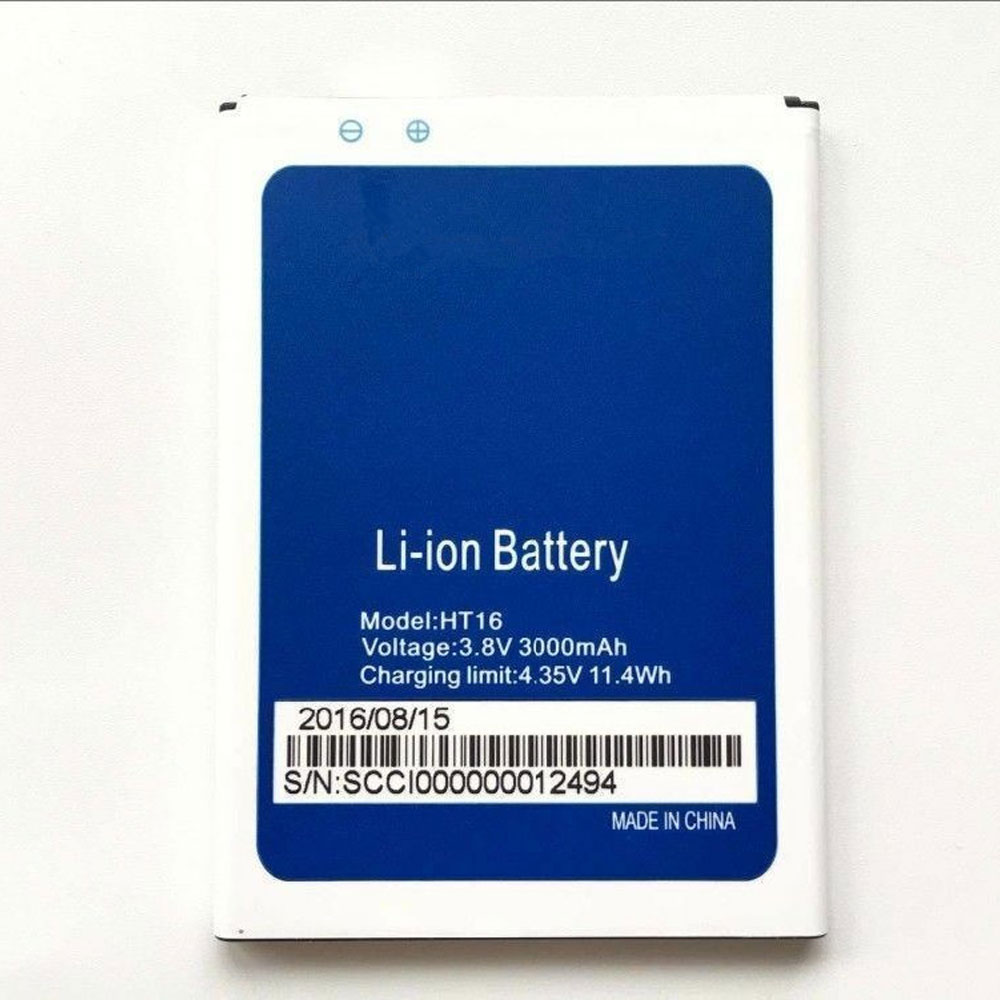
HOMTOM HT16 Specifications
Brand:Cell Phone Battery for HOMTOM
Capacity:3000mAh/11.4Wh
Voltage:3.8V/4.35V
Type:Li-ion
All products from our shop are 100% the highest quality!
We provide the high quality Laptop Adapters!
How to Maintenance your new replacement HOMTOM HT16 battery?
1. New HOMTOM HT16 battery pack must be fully charged before use.
2. New battery pack needs to be fully charged and discharged (cycled) a few times before it can condition to full capacity.
3.Laptop battery undergo self-discharging when left unused. Always store a HOMTOM HT16 battery pack in a fully charged stage for storage.
4. Fully drain and fully recharge your battery pack every few months.
5. Turn down the LCD brightness of your portable device.
6. Use built-in power management on your portable device.
7. Turn off LCD or other unnecessary accessories when not in use.
8. Set screen saver blank to 1 to 2 minutes of your notebook.
9. Add more RAM if you have extra RAM expansion slot, it will reduce the usage of hard drive and it is power exhaustive.
10. Close unused software in your HOMTOM HT16 phone .
11. Remove unused PC Cards or USB devices from your notebook.
12. Don´t watch DVD or play graphics intensive video games.
13. Don´t short circuit terminal or store your HOMTOM HT16 Cell Phone Batteries pack with metal parts. 14. Don´t drop or mutilate the HOMTOM HT16 battery pack.
15. Don´t expose to moisture or water.
Related popular recommendations:
58-000049 Battery Compatible Amazon Kindle PaperWhite 2nd Gen 6"
L14M2P21 Battery Compatible Lenovo S41-70 S41-70AM
ACDP-100D01 Laptop Adapters For Sony Vaio PCGA AC19V4 ACDP-100D01
TLI017C1 Battery Compatible Alcatel One Touch OT-5027B DAWN OT-4060O STREAK OT-4060A IDEAL
088796 Battery Compatible Bose Soundlink Mini 2 Pack
PA5162U-1BRS Battery Compatible Toshiba Portege R30 R30-A series
061384 Battery Compatible BOSE SOUNDLINK Mini Series
82-71363-04 Battery Compatible MOTOROLA MC70 MC75 FR68
FX30 Battery Compatible Motorola XT1575 Moto X Pure Edition / Moto X Style
Fit Machine Model HOMTOM HT16 - 3000mAh/11.4Wh - 3.8V/4.35V.
All products from our shop are 100% the highest quality! We provide the high quality Laptop Batteries. HOMTOM HT16 battery is best compatible with the original equipments.
OriccaBattery.co.uk ◆Free Shipping ◆ One year warranty ◆ 30 days money back guarantee.
Battery HT16 Replacement For HOMTOM HT16
HOMTOM HT16 Specifications
Brand:Cell Phone Battery for HOMTOM
Capacity:3000mAh/11.4Wh
Voltage:3.8V/4.35V
Type:Li-ion
All products from our shop are 100% the highest quality!
We provide the high quality Laptop Adapters!
PRODUCT COMPATIBILITY:
HT16REPLACEABILITY WITH THE FOLLOWING MODELS:
HOMTOM HT16How to Maintenance your new replacement HOMTOM HT16 battery?
1. New HOMTOM HT16 battery pack must be fully charged before use.
2. New battery pack needs to be fully charged and discharged (cycled) a few times before it can condition to full capacity.
3.Laptop battery undergo self-discharging when left unused. Always store a HOMTOM HT16 battery pack in a fully charged stage for storage.
4. Fully drain and fully recharge your battery pack every few months.
5. Turn down the LCD brightness of your portable device.
6. Use built-in power management on your portable device.
7. Turn off LCD or other unnecessary accessories when not in use.
8. Set screen saver blank to 1 to 2 minutes of your notebook.
9. Add more RAM if you have extra RAM expansion slot, it will reduce the usage of hard drive and it is power exhaustive.
10. Close unused software in your HOMTOM HT16 phone .
11. Remove unused PC Cards or USB devices from your notebook.
12. Don´t watch DVD or play graphics intensive video games.
13. Don´t short circuit terminal or store your HOMTOM HT16 Cell Phone Batteries pack with metal parts. 14. Don´t drop or mutilate the HOMTOM HT16 battery pack.
15. Don´t expose to moisture or water.
Related popular recommendations:
58-000049 Battery Compatible Amazon Kindle PaperWhite 2nd Gen 6"
L14M2P21 Battery Compatible Lenovo S41-70 S41-70AM
ACDP-100D01 Laptop Adapters For Sony Vaio PCGA AC19V4 ACDP-100D01
TLI017C1 Battery Compatible Alcatel One Touch OT-5027B DAWN OT-4060O STREAK OT-4060A IDEAL
088796 Battery Compatible Bose Soundlink Mini 2 Pack
PA5162U-1BRS Battery Compatible Toshiba Portege R30 R30-A series
061384 Battery Compatible BOSE SOUNDLINK Mini Series
82-71363-04 Battery Compatible MOTOROLA MC70 MC75 FR68
FX30 Battery Compatible Motorola XT1575 Moto X Pure Edition / Moto X Style
3.8V/4.35V HOMTOM HT17 Battery For HOMTOM HT17 HT17 Pro
Buy HOMTOM HT17 Cell Phone Battery replacement for HOMTOM HT17 HT17 Pro.
Fit Machine Model HOMTOM HT17 HT17 Pro - 3000mAh/11.4Wh - 3.8V/4.35V.
All products from our shop are 100% the highest quality! We provide the high quality Laptop Batteries. HOMTOM HT17 battery is best compatible with the original equipments.
OriccaBattery.co.uk ◆Free Shipping ◆ One year warranty ◆ 30 days money back guarantee.
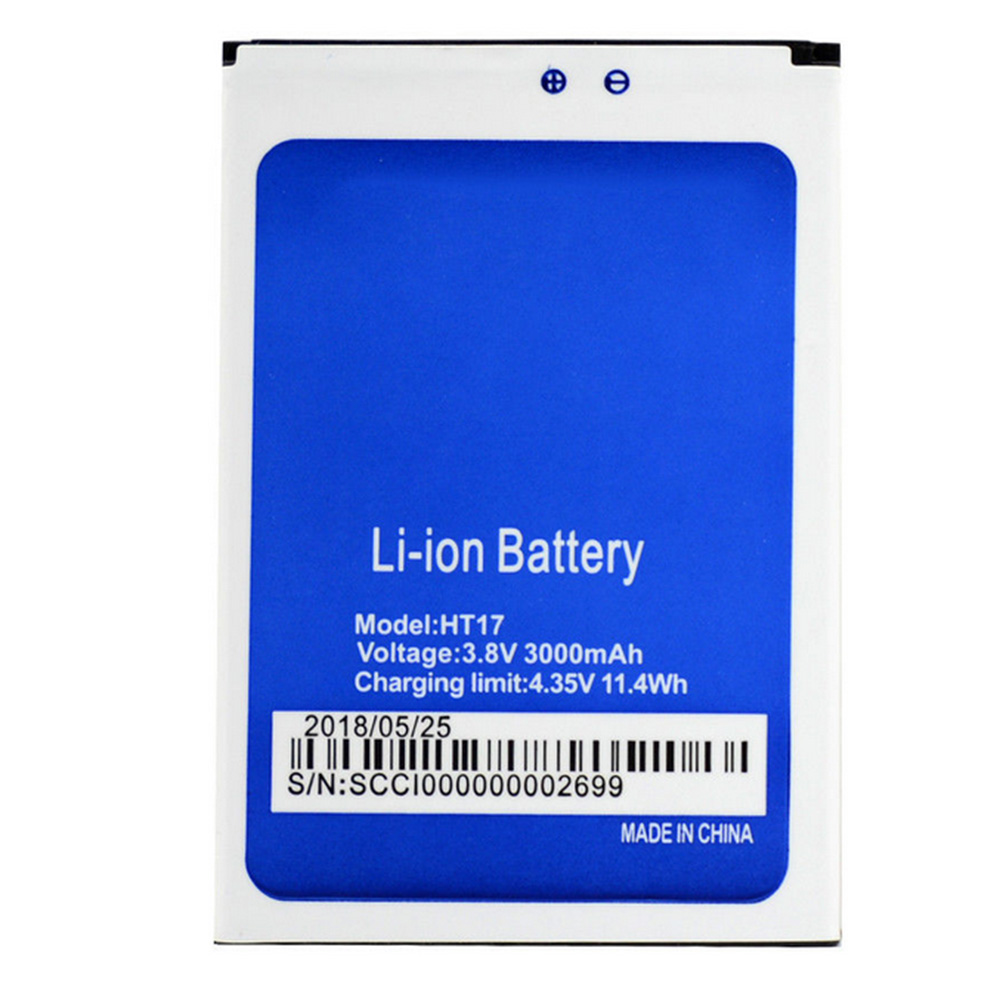
HOMTOM HT17 Specifications
Brand:Cell Phone Battery for HOMTOM
Capacity:3000mAh/11.4Wh
Voltage:3.8V/4.35V
Type:Li-ion
All products from our shop are 100% the highest quality!
We provide the high quality Laptop Adapters!
HT17_Pro
How to Maintenance your new replacement HOMTOM HT17 battery?
1. New HOMTOM HT17 battery pack must be fully charged before use.
2. New battery pack needs to be fully charged and discharged (cycled) a few times before it can condition to full capacity.
3.Laptop battery undergo self-discharging when left unused. Always store a HOMTOM HT17 battery pack in a fully charged stage for storage.
4. Fully drain and fully recharge your battery pack every few months.
5. Turn down the LCD brightness of your portable device.
6. Use built-in power management on your portable device.
7. Turn off LCD or other unnecessary accessories when not in use.
8. Set screen saver blank to 1 to 2 minutes of your notebook.
9. Add more RAM if you have extra RAM expansion slot, it will reduce the usage of hard drive and it is power exhaustive.
10. Close unused software in your HOMTOM HT17 HT17 Pro phone .
11. Remove unused PC Cards or USB devices from your notebook.
12. Don´t watch DVD or play graphics intensive video games.
13. Don´t short circuit terminal or store your HOMTOM HT17 Cell Phone Batteries pack with metal parts. 14. Don´t drop or mutilate the HOMTOM HT17 battery pack.
15. Don´t expose to moisture or water.
Related popular recommendations:
58-000049 Battery Compatible Amazon Kindle PaperWhite 2nd Gen 6"
L14M2P21 Battery Compatible Lenovo S41-70 S41-70AM
ACDP-100D01 Laptop Adapters For Sony Vaio PCGA AC19V4 ACDP-100D01
TLI017C1 Battery Compatible Alcatel One Touch OT-5027B DAWN OT-4060O STREAK OT-4060A IDEAL
088796 Battery Compatible Bose Soundlink Mini 2 Pack
PA5162U-1BRS Battery Compatible Toshiba Portege R30 R30-A series
061384 Battery Compatible BOSE SOUNDLINK Mini Series
82-71363-04 Battery Compatible MOTOROLA MC70 MC75 FR68
FX30 Battery Compatible Motorola XT1575 Moto X Pure Edition / Moto X Style
Fit Machine Model HOMTOM HT17 HT17 Pro - 3000mAh/11.4Wh - 3.8V/4.35V.
All products from our shop are 100% the highest quality! We provide the high quality Laptop Batteries. HOMTOM HT17 battery is best compatible with the original equipments.
OriccaBattery.co.uk ◆Free Shipping ◆ One year warranty ◆ 30 days money back guarantee.
Battery HT17 Replacement For HOMTOM HT17 HT17 Pro
HOMTOM HT17 Specifications
Brand:Cell Phone Battery for HOMTOM
Capacity:3000mAh/11.4Wh
Voltage:3.8V/4.35V
Type:Li-ion
All products from our shop are 100% the highest quality!
We provide the high quality Laptop Adapters!
PRODUCT COMPATIBILITY:
HT17HT17_Pro
REPLACEABILITY WITH THE FOLLOWING MODELS:
HOMTOM HT17 HT17 ProHow to Maintenance your new replacement HOMTOM HT17 battery?
1. New HOMTOM HT17 battery pack must be fully charged before use.
2. New battery pack needs to be fully charged and discharged (cycled) a few times before it can condition to full capacity.
3.Laptop battery undergo self-discharging when left unused. Always store a HOMTOM HT17 battery pack in a fully charged stage for storage.
4. Fully drain and fully recharge your battery pack every few months.
5. Turn down the LCD brightness of your portable device.
6. Use built-in power management on your portable device.
7. Turn off LCD or other unnecessary accessories when not in use.
8. Set screen saver blank to 1 to 2 minutes of your notebook.
9. Add more RAM if you have extra RAM expansion slot, it will reduce the usage of hard drive and it is power exhaustive.
10. Close unused software in your HOMTOM HT17 HT17 Pro phone .
11. Remove unused PC Cards or USB devices from your notebook.
12. Don´t watch DVD or play graphics intensive video games.
13. Don´t short circuit terminal or store your HOMTOM HT17 Cell Phone Batteries pack with metal parts. 14. Don´t drop or mutilate the HOMTOM HT17 battery pack.
15. Don´t expose to moisture or water.
Related popular recommendations:
58-000049 Battery Compatible Amazon Kindle PaperWhite 2nd Gen 6"
L14M2P21 Battery Compatible Lenovo S41-70 S41-70AM
ACDP-100D01 Laptop Adapters For Sony Vaio PCGA AC19V4 ACDP-100D01
TLI017C1 Battery Compatible Alcatel One Touch OT-5027B DAWN OT-4060O STREAK OT-4060A IDEAL
088796 Battery Compatible Bose Soundlink Mini 2 Pack
PA5162U-1BRS Battery Compatible Toshiba Portege R30 R30-A series
061384 Battery Compatible BOSE SOUNDLINK Mini Series
82-71363-04 Battery Compatible MOTOROLA MC70 MC75 FR68
FX30 Battery Compatible Motorola XT1575 Moto X Pure Edition / Moto X Style
Friday, 19 July 2019
How to Charge a Battery Without a Charger
Have you ever had a dead battery in your camera at just the moment when you need them most? Worse still is a dead cell in an emergency situation. And you can't always carry a charger with you. For those who like to (or need to) improvise, these recommendations may prove useful.
Using a Battery to Charge a Battery
1.Remove the battery from the device. You will need access to the connection points on the battery. Keep in mind that the battery is not intended to be accessed on certain models of cell phone, so know what can be done with the model you have. On most (but not all) Android and Windows phones the back can be removed with the appropriate amount of pressure in just the right spot. Do not attempt this with most Apple products.
2.Find some AA, AAA, or 9-volt batteries. Unlike the power that comes from the wall outlet (alternating current), the power in common household batteries is no different from that used by your cell phone or camera battery.
Perhaps you are baffled that anyone would suggest using one battery to charge another. Maybe you were expecting some magic trick that would allow you to add charge to your battery without having to find an alternate source of electric power. In fact, that is not possible. One of the fundamental laws of physics (the law of conservation of energy/conservation of mass) makes clear that you can't get something for nothing.Deal with it.
It is recommended that you charge your battery rather than attempt to hotwire your electronic device and use the alternative batteries directly. Using the improper amount of amperage or voltage can potentially damage complex circuitry, so such methods are obviously not worth the risk.
3.Identify the positive and negative connectors on each battery. On the AAs and other household batteries, these will be marked. For most cell phone batteries, the positive connector will be the one closest to the edge, while the negative connector will usually be the one farthest from the edge (there may be three or four connectors, but the middle one or two are used for temperature regulation and other functions).
4.Match voltage of your battery which need to charge and other battery (AA, AAA or others with enough power to provide). Normally now a day's Cellphone battery needs more than 3.7V DC to get charged. So multiple AA or AAAs or one 9V battery will be idle for providing a charge. Keep in mind that normal AA or AAA battery on everyday household use provide 1.5V each. So to gain more than 3.7V, you need 3 AA or AAA battery connected in series. 1.5V + 1.5V + 1.5V = 4.5V would be your power source if battery on your hand is either AA or AAA model.
5.Obtain two pieces of metal wire. Ideally, these will be covered in plastic insulation except for exposed ends.
6.Tape or clamp the wires to the battery that will be providing a charge and the battery that requires a charge. These wires may get hot (though most likely they will not if you are doing it properly). It will also take quite a long time to transfer the charge. You don't want to be holding them the whole time.
If you are using AA and AAA batteries; you may want to connect them to each other "in serie" before attaching them to the battery requiring a charge. This means using wire to connect the negative side of all the small batteries to the negative connector on the battery that needs a charge, and the same for the positive side.
7.After some time, the battery should be charged. Keep in mind that it probably won't be fully charged, but you should have at least some use of the device that you needed.
Using the Rubbing Trick
1.Remove the battery from the electronic device. Hold it in your hands.
2.Rub the battery hard by using both of your hands to generate enough friction and heat. Continue to do this for 30 seconds to several minutes.
Note: Your battery is not being recharged. Some internet commentators have suggested the rubbing the battery provides it with additional charge, perhaps from built up static electricity.
This interpretation is entirely incorrect.
Lithium ion cells, like all genuine batteries, release electricity as a consequence of chemical reactions. As predicted by the Arrhenius equation, these reactions become more powerful as temperatures increase.[6][7] Essentially, you are improving the conductivity of the battery by raising its temperature.
3.Place the battery back in the electronic device. You may only have a few moments of battery life, so make the most of them.
Largest range of Laptop Batteries, Chargers & AC adapters. Find the right battery, ac adapters for your phone or tablet. 12 Month Warranty,30 Days Money Back!
Using a Battery to Charge a Battery
1.Remove the battery from the device. You will need access to the connection points on the battery. Keep in mind that the battery is not intended to be accessed on certain models of cell phone, so know what can be done with the model you have. On most (but not all) Android and Windows phones the back can be removed with the appropriate amount of pressure in just the right spot. Do not attempt this with most Apple products.
2.Find some AA, AAA, or 9-volt batteries. Unlike the power that comes from the wall outlet (alternating current), the power in common household batteries is no different from that used by your cell phone or camera battery.
Perhaps you are baffled that anyone would suggest using one battery to charge another. Maybe you were expecting some magic trick that would allow you to add charge to your battery without having to find an alternate source of electric power. In fact, that is not possible. One of the fundamental laws of physics (the law of conservation of energy/conservation of mass) makes clear that you can't get something for nothing.Deal with it.
It is recommended that you charge your battery rather than attempt to hotwire your electronic device and use the alternative batteries directly. Using the improper amount of amperage or voltage can potentially damage complex circuitry, so such methods are obviously not worth the risk.
3.Identify the positive and negative connectors on each battery. On the AAs and other household batteries, these will be marked. For most cell phone batteries, the positive connector will be the one closest to the edge, while the negative connector will usually be the one farthest from the edge (there may be three or four connectors, but the middle one or two are used for temperature regulation and other functions).
4.Match voltage of your battery which need to charge and other battery (AA, AAA or others with enough power to provide). Normally now a day's Cellphone battery needs more than 3.7V DC to get charged. So multiple AA or AAAs or one 9V battery will be idle for providing a charge. Keep in mind that normal AA or AAA battery on everyday household use provide 1.5V each. So to gain more than 3.7V, you need 3 AA or AAA battery connected in series. 1.5V + 1.5V + 1.5V = 4.5V would be your power source if battery on your hand is either AA or AAA model.
5.Obtain two pieces of metal wire. Ideally, these will be covered in plastic insulation except for exposed ends.
6.Tape or clamp the wires to the battery that will be providing a charge and the battery that requires a charge. These wires may get hot (though most likely they will not if you are doing it properly). It will also take quite a long time to transfer the charge. You don't want to be holding them the whole time.
If you are using AA and AAA batteries; you may want to connect them to each other "in serie" before attaching them to the battery requiring a charge. This means using wire to connect the negative side of all the small batteries to the negative connector on the battery that needs a charge, and the same for the positive side.
7.After some time, the battery should be charged. Keep in mind that it probably won't be fully charged, but you should have at least some use of the device that you needed.
Using the Rubbing Trick
1.Remove the battery from the electronic device. Hold it in your hands.
2.Rub the battery hard by using both of your hands to generate enough friction and heat. Continue to do this for 30 seconds to several minutes.
Note: Your battery is not being recharged. Some internet commentators have suggested the rubbing the battery provides it with additional charge, perhaps from built up static electricity.
This interpretation is entirely incorrect.
Lithium ion cells, like all genuine batteries, release electricity as a consequence of chemical reactions. As predicted by the Arrhenius equation, these reactions become more powerful as temperatures increase.[6][7] Essentially, you are improving the conductivity of the battery by raising its temperature.
3.Place the battery back in the electronic device. You may only have a few moments of battery life, so make the most of them.
Largest range of Laptop Batteries, Chargers & AC adapters. Find the right battery, ac adapters for your phone or tablet. 12 Month Warranty,30 Days Money Back!
Protéger son smartphone de la casse
Indispensables à notre quotidien, de plus en plus chers, nos smartphones nous sont précieux et les protéger de la casse devient un impératif. Loin d’être incassables et même programmés pour tomber en panne à plus ou moins longues échéances, votre téléphone est pourtant un indispensable de votre quotidien, il est donc nécessaire de faire le protéger au mieux.
Plusieurs solutions sont possibles pour éviter les dommages sur votre téléphone, suivez le guide !
Quel intérêt de protéger son téléphone ?
Avec des smartphones de plus en plus fins et des écrans de plus en plus grands, les smartphones récents dévoilent aussi plusieurs faiblesses en risquant d’être plus facilement endommagés en cas de choc. Protéger son téléphone, c’est faire en sorte qu’il dure le plus longtemps possible.
Outre le fait qu’on espère pouvoir s’en servir le plus longtemps possible, protéger son smartphone c’est aussi s’assurer de son bon fonctionnement à long terme.
Au moment où l’envie d’un nouveau smartphone se fera sentir, vous pourrez peut-être envisager de tirer profit de votre ancien téléphone en le revendant sur le marché d’occasion. Toutefois celui-ci doit être en bon état si vous espérez en tirer un bon prix et pouvoir ainsi diminuer le coût de votre nouvelle acquisition.
La priorité : l’écran
Quand on parle de protection pour smartphone on pense souvent coque ou autre cover en oubliant l’écran ! C’est pourtant lui le point le plus fragile et le plus exposé de votre téléphone ! Les vitres étant toujours plus grandes, la surface potentiellement exposée aux chocs en cas de chute l’est aussi !
Il est donc primordial d’opter pour une protection en verre trempé. Il en existe pour les différents modèles, capables de se fondre avec l’écran, elle protège l’écran sans en changer l’utilisation. Véritable absorbeur de choc, avec une protection en verre trempé, le tactile fonctionnera très bien et l’image ne sera pas altérée, mais votre écran, lui sera complètement protégé.
Attention à la pose : l’écran comme la protection doivent être parfaitement propres. Au moment de la pose, il faudra aussi chasser correctement les bulles d’air, au risque de ne pas pouvoir profiter pleinement de votre écran.
La coque pour une protection intégrale
Si les smartphones sont conçus pour résister aux petits chocs, en cas de gros chocs ils risquent, au mieux, quelques égratignures, et au pire, d’être cabossés ou éventrés. Même si vous l’avez choisi avec soin pour sa couleur, son design, avec une coque, vous êtes assurés de limiter les dégâts en cas de choc.
Il existe de très nombreux modèles parmi lesquels des modèles en silicone qui se moule sur votre téléphone, et même transparents pour que vous puissiez pleinement profiter de votre joli téléphone.
Pour les personnes particulièrement maladroites ou évoluant dans un contexte à risque, notamment les métiers en extérieur, sachez qu’il existe des coques tout terrain qui résistent à peu près à tout ! Renforcées, elles protègent vos téléphones avec des matériaux qui absorbent les chocs. Parfois plus lourdes, elles sont souvent moins élégantes mais au diable l’élégance quand il s’agit de faire durer son téléphone portable !
Les flip-covers pour conjuguer protection et aspects pratique.
Les couvertures intégrales offrent une protection plus rigide que la simple coque mais elles offrent la possibilité de stocker des cartes et autres tickets de transports ou paiement.
Grâce à la couverture, tout le téléphone est protégé, écran inclus. En contrepartie le téléphone est complètement caché par la couverture, mais rien n’empêche d’opter pour une jolie couverture qui correspond à vos goûts !
>>>>>>>>>>>>>Cell Phone Battery
Plusieurs solutions sont possibles pour éviter les dommages sur votre téléphone, suivez le guide !
Quel intérêt de protéger son téléphone ?
Avec des smartphones de plus en plus fins et des écrans de plus en plus grands, les smartphones récents dévoilent aussi plusieurs faiblesses en risquant d’être plus facilement endommagés en cas de choc. Protéger son téléphone, c’est faire en sorte qu’il dure le plus longtemps possible.
Outre le fait qu’on espère pouvoir s’en servir le plus longtemps possible, protéger son smartphone c’est aussi s’assurer de son bon fonctionnement à long terme.
Au moment où l’envie d’un nouveau smartphone se fera sentir, vous pourrez peut-être envisager de tirer profit de votre ancien téléphone en le revendant sur le marché d’occasion. Toutefois celui-ci doit être en bon état si vous espérez en tirer un bon prix et pouvoir ainsi diminuer le coût de votre nouvelle acquisition.
La priorité : l’écran
Quand on parle de protection pour smartphone on pense souvent coque ou autre cover en oubliant l’écran ! C’est pourtant lui le point le plus fragile et le plus exposé de votre téléphone ! Les vitres étant toujours plus grandes, la surface potentiellement exposée aux chocs en cas de chute l’est aussi !
Il est donc primordial d’opter pour une protection en verre trempé. Il en existe pour les différents modèles, capables de se fondre avec l’écran, elle protège l’écran sans en changer l’utilisation. Véritable absorbeur de choc, avec une protection en verre trempé, le tactile fonctionnera très bien et l’image ne sera pas altérée, mais votre écran, lui sera complètement protégé.
Attention à la pose : l’écran comme la protection doivent être parfaitement propres. Au moment de la pose, il faudra aussi chasser correctement les bulles d’air, au risque de ne pas pouvoir profiter pleinement de votre écran.
La coque pour une protection intégrale
Si les smartphones sont conçus pour résister aux petits chocs, en cas de gros chocs ils risquent, au mieux, quelques égratignures, et au pire, d’être cabossés ou éventrés. Même si vous l’avez choisi avec soin pour sa couleur, son design, avec une coque, vous êtes assurés de limiter les dégâts en cas de choc.
Il existe de très nombreux modèles parmi lesquels des modèles en silicone qui se moule sur votre téléphone, et même transparents pour que vous puissiez pleinement profiter de votre joli téléphone.
Pour les personnes particulièrement maladroites ou évoluant dans un contexte à risque, notamment les métiers en extérieur, sachez qu’il existe des coques tout terrain qui résistent à peu près à tout ! Renforcées, elles protègent vos téléphones avec des matériaux qui absorbent les chocs. Parfois plus lourdes, elles sont souvent moins élégantes mais au diable l’élégance quand il s’agit de faire durer son téléphone portable !
Les flip-covers pour conjuguer protection et aspects pratique.
Les couvertures intégrales offrent une protection plus rigide que la simple coque mais elles offrent la possibilité de stocker des cartes et autres tickets de transports ou paiement.
Grâce à la couverture, tout le téléphone est protégé, écran inclus. En contrepartie le téléphone est complètement caché par la couverture, mais rien n’empêche d’opter pour une jolie couverture qui correspond à vos goûts !
>>>>>>>>>>>>>Cell Phone Battery
How to Know when You Have to Get a Replacement Battery
Between browsing the internet, playing games, and using other apps, the battery on your phone or laptop takes a daily beating. Batteries have limited life spans and can wear down as they get older and are used more and more. It will become necessary to replace your battery, but it can be hard to tell exactly when you should make the change. This article will help you know when you have to get a replacement battery.
1.Check for excessive heat when the battery is in use. A little heat is normal when batteries are recharging or working, but excessive heat can be a sign that they are dying. Notice if the battery starts to heat up significantly more than normal, or compare your suspicious battery to a newer one to see if there is a significant difference in heat.
2.See if your battery gets bloated or swells up. Sometimes when the rechargeable batteries start depleting, the internal cell ruptures and starts leaking. A small bulge will be the first visible sign of this starting. To check if the battery is bloated, place it on flat surface. If it wobbles or does not lie down properly, that could mean it's depleting.
Using bloated batteries is riskier as they might explode on being charged.
3.Notice any reduced battery performance. A fully charged phone battery should provide at least 20 hrs of battery life on standby mode and minimum 7 hrs on usage, while laptop batteries usually have a life of around 2.5 - 3 hrs on usage and several days of shelf life. If your battery lasts for a significantly shorter period of time, or if you've noticed a decrease in the battery life during the time that you've had your device, this could be a sign that the battery is wearing down.
4.Take note of any automatic or sudden losses of power. Sometimes when the unit’s capacity is deteriorated it still as fully charged, after only charging very little. When you use it, it shows the battery as depleting very fast. Sometimes, the battery may shut down, powering off the device, while you are using heavy applications or on a call for a long time. This generally appears with excessive heating of the battery.
If when you switch the phone back on, you find that the battery is not hot and there is still power left, then phone is faulty but your battery should be fine.
5.Look for visible corrosion or physical changes. See if the terminals and electric panels on the battery appear to be rusted. No matter how small the area is, show it to a specialist. Visible corrosion means that there is some internal problem and it is time to change the battery. Continuing with the corrosive battery may end up destroying the phone.
Tips
You must know where you can get a proper replacement battery. It is important to check that the specification of the replacement battery is same as the rechargeable battery and is compatible with the device.
All Cell Phone Battery in oriccabattery.co.uk online store, such as Acer, Asus, Gateway, Apple, HP, Compaq, Sony, Fujitsu, Lenovo, Toshiba or MSI Cell Phone Battery and so on.
1.Check for excessive heat when the battery is in use. A little heat is normal when batteries are recharging or working, but excessive heat can be a sign that they are dying. Notice if the battery starts to heat up significantly more than normal, or compare your suspicious battery to a newer one to see if there is a significant difference in heat.
2.See if your battery gets bloated or swells up. Sometimes when the rechargeable batteries start depleting, the internal cell ruptures and starts leaking. A small bulge will be the first visible sign of this starting. To check if the battery is bloated, place it on flat surface. If it wobbles or does not lie down properly, that could mean it's depleting.
Using bloated batteries is riskier as they might explode on being charged.
3.Notice any reduced battery performance. A fully charged phone battery should provide at least 20 hrs of battery life on standby mode and minimum 7 hrs on usage, while laptop batteries usually have a life of around 2.5 - 3 hrs on usage and several days of shelf life. If your battery lasts for a significantly shorter period of time, or if you've noticed a decrease in the battery life during the time that you've had your device, this could be a sign that the battery is wearing down.
4.Take note of any automatic or sudden losses of power. Sometimes when the unit’s capacity is deteriorated it still as fully charged, after only charging very little. When you use it, it shows the battery as depleting very fast. Sometimes, the battery may shut down, powering off the device, while you are using heavy applications or on a call for a long time. This generally appears with excessive heating of the battery.
If when you switch the phone back on, you find that the battery is not hot and there is still power left, then phone is faulty but your battery should be fine.
5.Look for visible corrosion or physical changes. See if the terminals and electric panels on the battery appear to be rusted. No matter how small the area is, show it to a specialist. Visible corrosion means that there is some internal problem and it is time to change the battery. Continuing with the corrosive battery may end up destroying the phone.
Tips
You must know where you can get a proper replacement battery. It is important to check that the specification of the replacement battery is same as the rechargeable battery and is compatible with the device.
All Cell Phone Battery in oriccabattery.co.uk online store, such as Acer, Asus, Gateway, Apple, HP, Compaq, Sony, Fujitsu, Lenovo, Toshiba or MSI Cell Phone Battery and so on.
Thursday, 18 July 2019
3.7V VARTA CP1654_A3 Battery For VARTA CP1654 A3 Bluetoot Headset
Buy VARTA CP1654_A3 Battery replacement for VARTA CP1654 A3 Bluetoot Headset.
Fit Machine Model VARTA CP1654 A3 Bluetoot Headset - 0.4WH - 3.7V.
All products from our shop are 100% the highest quality! We provide the high quality Laptop Batteries. VARTA CP1654_A3 battery is best compatible with the original equipments.
OriccaBattery.co.uk ◆Free Shipping ◆ One year warranty ◆ 30 days money back guarantee.
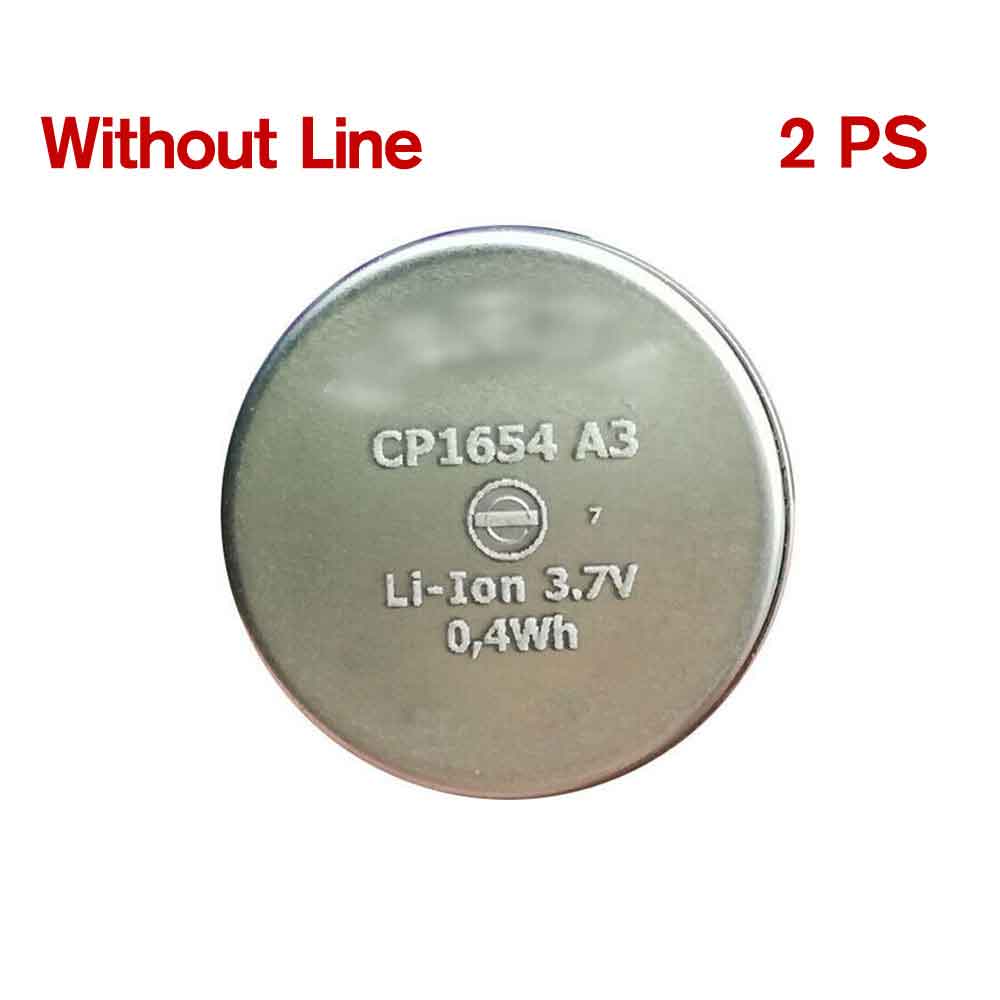
VARTA CP1654_A3 Specifications
Brand: Battery for VARTA
Capacity:0.4WH
Voltage:3.7V
Type:Li-ion
All products from our shop are 100% the highest quality!
We provide the high quality Laptop Adapters!
How to Maintenance your new replacement VARTA CP1654_A3 battery?
1. New VARTA CP1654_A3 battery pack must be fully charged before use.
2. New battery pack needs to be fully charged and discharged (cycled) a few times before it can condition to full capacity.
3.Laptop battery undergo self-discharging when left unused. Always store a VARTA CP1654_A3 battery pack in a fully charged stage for storage.
4. Fully drain and fully recharge your battery pack every few months.
5. Turn down the LCD brightness of your portable device.
6. Use built-in power management on your portable device.
7. Turn off LCD or other unnecessary accessories when not in use.
8. Set screen saver blank to 1 to 2 minutes of your notebook.
9. Add more RAM if you have extra RAM expansion slot, it will reduce the usage of hard drive and it is power exhaustive.
10. Close unused software in your VARTA CP1654 A3 Bluetoot Headset .
11. Remove unused PC Cards or USB devices from your notebook.
12. Don´t watch DVD or play graphics intensive video games.
13. Don´t short circuit terminal or store your VARTA CP1654_A3 Batteries pack with metal parts. 14. Don´t drop or mutilate the VARTA CP1654_A3 battery pack.
15. Don´t expose to moisture or water.
Related popular recommendations:
58-000049 Battery Compatible Amazon Kindle PaperWhite 2nd Gen 6"
L14M2P21 Battery Compatible Lenovo S41-70 S41-70AM
ACDP-100D01 Laptop Adapters For Sony Vaio PCGA AC19V4 ACDP-100D01
TLI017C1 Battery Compatible Alcatel One Touch OT-5027B DAWN OT-4060O STREAK OT-4060A IDEAL
088796 Battery Compatible Bose Soundlink Mini 2 Pack
PA5162U-1BRS Battery Compatible Toshiba Portege R30 R30-A series
061384 Battery Compatible BOSE SOUNDLINK Mini Series
82-71363-04 Battery Compatible MOTOROLA MC70 MC75 FR68
FX30 Battery Compatible Motorola XT1575 Moto X Pure Edition / Moto X Style
Fit Machine Model VARTA CP1654 A3 Bluetoot Headset - 0.4WH - 3.7V.
All products from our shop are 100% the highest quality! We provide the high quality Laptop Batteries. VARTA CP1654_A3 battery is best compatible with the original equipments.
OriccaBattery.co.uk ◆Free Shipping ◆ One year warranty ◆ 30 days money back guarantee.
Battery CP1654_A3 Replacement For VARTA CP1654 A3 Bluetoot Headset
VARTA CP1654_A3 Specifications
Brand: Battery for VARTA
Capacity:0.4WH
Voltage:3.7V
Type:Li-ion
All products from our shop are 100% the highest quality!
We provide the high quality Laptop Adapters!
PRODUCT COMPATIBILITY:
CP1654_A3REPLACEABILITY WITH THE FOLLOWING MODELS:
VARTA CP1654 A3 Bluetoot HeadsetHow to Maintenance your new replacement VARTA CP1654_A3 battery?
1. New VARTA CP1654_A3 battery pack must be fully charged before use.
2. New battery pack needs to be fully charged and discharged (cycled) a few times before it can condition to full capacity.
3.Laptop battery undergo self-discharging when left unused. Always store a VARTA CP1654_A3 battery pack in a fully charged stage for storage.
4. Fully drain and fully recharge your battery pack every few months.
5. Turn down the LCD brightness of your portable device.
6. Use built-in power management on your portable device.
7. Turn off LCD or other unnecessary accessories when not in use.
8. Set screen saver blank to 1 to 2 minutes of your notebook.
9. Add more RAM if you have extra RAM expansion slot, it will reduce the usage of hard drive and it is power exhaustive.
10. Close unused software in your VARTA CP1654 A3 Bluetoot Headset .
11. Remove unused PC Cards or USB devices from your notebook.
12. Don´t watch DVD or play graphics intensive video games.
13. Don´t short circuit terminal or store your VARTA CP1654_A3 Batteries pack with metal parts. 14. Don´t drop or mutilate the VARTA CP1654_A3 battery pack.
15. Don´t expose to moisture or water.
Related popular recommendations:
58-000049 Battery Compatible Amazon Kindle PaperWhite 2nd Gen 6"
L14M2P21 Battery Compatible Lenovo S41-70 S41-70AM
ACDP-100D01 Laptop Adapters For Sony Vaio PCGA AC19V4 ACDP-100D01
TLI017C1 Battery Compatible Alcatel One Touch OT-5027B DAWN OT-4060O STREAK OT-4060A IDEAL
088796 Battery Compatible Bose Soundlink Mini 2 Pack
PA5162U-1BRS Battery Compatible Toshiba Portege R30 R30-A series
061384 Battery Compatible BOSE SOUNDLINK Mini Series
82-71363-04 Battery Compatible MOTOROLA MC70 MC75 FR68
FX30 Battery Compatible Motorola XT1575 Moto X Pure Edition / Moto X Style
Subscribe to:
Comments (Atom)